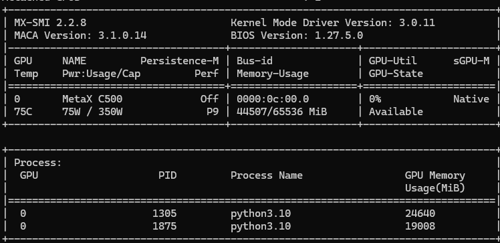
从下方mx-smi可以看到显存占用已经执行了,目前有2个vllm服务占用了显存
一、软硬件信息
1.服务器厂家:
System Information
Manufacturer: RongXinZhiYuan
Product Name: DAU-H100
Version: 0.1
Serial Number: 001BBW18010027
UUID: 00112233-4455-6677-8899-aabbccddeeff
Wake-up Type: Power Switch
SKU Number: Kunlun_Hygon65N32_SKU
Family: Type1Family
Handle 0x0013, DMI type 12, 5 bytes
System Configuration Options
Option 1: ConfigOptions String 1
Option 2: ConfigOptions String 2
Handle 0x0015, DMI type 32, 11 bytes
System Boot Information
Status: No errors detected
2.沐曦GPU型号:
MetaX C500
3.操作系统内核版本:
Static hostname: host
Icon name: computer-server
Chassis: server
Machine ID: d03463cf8d154a38873c9161c0aa65da
Boot ID: f0934e776e614dd3aa36820d16e7ee84
Operating System: Ubuntu 22.04.5 LTS
Kernel: Linux 5.15.0-119-generic
Architecture: x86-64
4.是否开启CPU虚拟化:
Virtualization: AMD-V
5.mx-smi回显: 这里是因为2个服务都开启了,但是有一个开启了一半,一直卡住,但是显存已经占用完毕了。
mx-smi version: 2.2.3
=================== MetaX System Management Interface Log ===================
Timestamp : Tue Oct 21 04:52:31 2025
Attached GPUs : 1
+---------------------------------------------------------------------------------+
| MX-SMI 2.2.3 Kernel Mode Driver Version: 2.14.6 |
| MACA Version: 2.32.0.6 BIOS Version: 1.24.3.0 |
|------------------------------------+---------------------+----------------------+
| GPU NAME | Bus-id | GPU-Util |
| Temp Pwr:Usage/Cap | Memory-Usage | |
|====================================+=====================+======================|
| 0 MetaX C500 | 0000:0f:00.0 | 0% |
| 74C 75W / 350W | 41244/65536 MiB | |
+------------------------------------+---------------------+----------------------+
+---------------------------------------------------------------------------------+
| Process: |
| GPU PID Process Name GPU Memory |
| Usage(MiB) |
|=================================================================================|
| 0 2317608 python3.10 20480 |
| 0 2327607 python3.10 19904 |
+---------------------------------------------------------------------------------+
6.docker info回显:
Client: Docker Engine - Community
Version: 28.5.1
Context: default
Debug Mode: false
Plugins:
buildx: Docker Buildx (Docker Inc.)
Version: v0.29.1
Path: /usr/libexec/docker/cli-plugins/docker-buildx
compose: Docker Compose (Docker Inc.)
Version: v2.40.0
Path: /usr/libexec/docker/cli-plugins/docker-compose
Server:
Containers: 2
Running: 2
Paused: 0
Stopped: 0
Images: 3
Server Version: 28.5.1
Storage Driver: overlay2
Backing Filesystem: extfs
Supports d_type: true
Using metacopy: false
Native Overlay Diff: true
userxattr: false
Logging Driver: json-file
Cgroup Driver: systemd
Cgroup Version: 2
Plugins:
Volume: local
Network: bridge host ipvlan macvlan null overlay
Log: awslogs fluentd gcplogs gelf journald json-file local splunk syslog
CDI spec directories:
/etc/cdi
/var/run/cdi
Swarm: inactive
Runtimes: io.containerd.runc.v2 runc
Default Runtime: runc
Init Binary: docker-init
containerd version: b98a3aace656320842a23f4a392a33f46af97866
runc version: v1.3.0-0-g4ca628d1
init version: de40ad0
Security Options:
apparmor
seccomp
Profile: builtin
cgroupns
Kernel Version: 5.15.0-119-generic
Operating System: Ubuntu 22.04.5 LTS
OSType: linux
Architecture: x86_64
CPUs: 16
Total Memory: 62.47GiB
Name: host
ID: 8eec869e-d6f4-4a72-a7c6-bc08d84e93e1
Docker Root Dir: /var/lib/docker
Debug Mode: false
Experimental: false
Insecure Registries:
::1/128
127.0.0.0/8
Live Restore Enabled: false
7.镜像版本:
cr.metax-tech.com/public-ai-release/maca/modelzoo.llm.vllm:maca.ai3.1.0.7-torch2.6-py310-ubuntu22.04-amd64