
好的,谢谢
Raining
- Members
- Joined 2025年10月21日
-
-
报错如下: cr.metax-tech.com && docker pull cr.metax-tech.com/public-ai-release/maca/onnxruntime:1.12.0-maca.ai3.7.0.8-torch2.4-py38-ubuntu22.04-amd64
WARNING! Using --password via the CLI is insecure. Use --password-stdin.
Error response from daemon: Get "cr.metax-tech.com/v2/": unauthorized: unauthorized: invalid token claims, error: standard claim invalid: token is expired by 58m36.162168197s 关键是每次都是重新下载,下载一半就断了,又开始重新下载 -
-
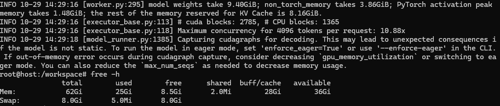
还是卡住,但是现在第二个模型启动的时候卡在这里, 是需要我启动的时候加上--enforce-eager吗?:
INFO 10-29 14:29:16 [executor_base.py:113] # cuda blocks: 2785, # CPU blocks: 1365
INFO 10-29 14:29:16 [executor_base.py:118] Maximum concurrency for 4096 tokens per request: 10.88x
INFO 10-29 14:29:18 [model_runner.py:1385] Capturing cudagraphs for decoding. This may lead to unexpected consequences if the model is not static. To run the model in eager mode, set 'enforce_eager=True' or use '--enforce-eager' in the CLI. If out-of-memory error occurs during cudagraph capture, consider decreasinggpu_memory_utilizationor switching to eager mode. You can also reduce themax_num_seqsas needed to decrease memory usage.内存情况如下:
-
-
-
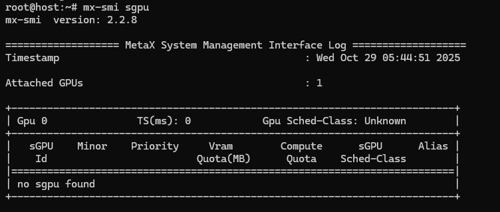
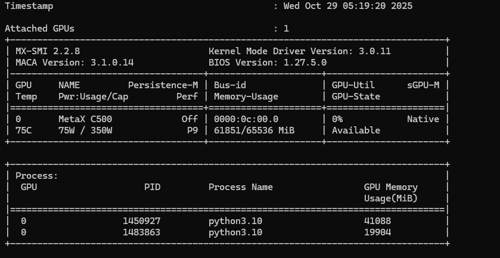
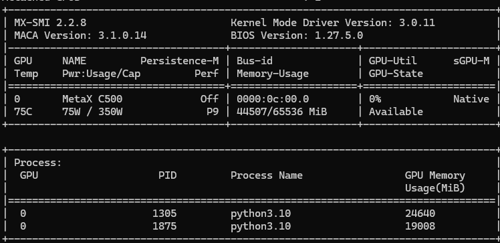
你好,我一个设置的0.34,一个0.3还是不行,一直卡在下面这里就不走了,显存明显还有20G的剩余:
[rank0]:W1029 09:35:11.250000 1875 site-packages/torch/_inductor/utils.py:1197] [0/0] Forcing disable 'CUTLASS' backend as it is not supported in maca platform.
[rank0]:W1029 09:35:11.259000 1875 site-packages/torch/_inductor/utils.py:1197] [0/0] Forcing disable 'CUTLASS' backend as it is not supported in maca platform.
INFO 10-29 09:35:12 [backends.py:215] Compiling a graph for dynamic shape takes 71.86 s
INFO 10-29 09:35:47 [monitor.py:34] torch.compile takes 84.68 s in total
INFO 10-29 09:35:48 [gpu_worker.py:255] Available KV cache memory: 1.55 GiB
INFO 10-29 09:35:48 [kv_cache_utils.py:833] GPU KV cache size: 12,688 tokens
INFO 10-29 09:35:48 [kv_cache_utils.py:837] Maximum concurrency for 4,096 tokens per request: 3.10x -
-
-
之前部署一个模型,推理也没问题,但是升级显卡驱动到3.1.0.14,突然就不行了,推理启动有时候有问题,有时候能启动,但是不能推理,没有返回数据,有时候启动还报错,镜像版本是:cr.metax-tech.com/public-ai-release/maca/modelzoo.llm.vllm:maca.ai3.1.0.7-torch2.6-py310-ubuntu22.04-amd64, 会不会是因为镜像版本低于驱动版本造成的?如果是的话,去哪里下载最新的docker镜像:
[19:40:55.226][MXKW][E]queues.c :812 : [mxkwCreateQueueBlock]ioctl create queue block failed -1
[19:40:55.228][MXC][E]exception: DMAQueue create failed at mxkwCreateQueueBlock.
[19:40:55.229][MCR][E]mx_device.cpp :3544: Mxc copy from host to device failed with code 4104
[19:40:55.243][MXKW][E]queues.c :812 : [mxkwCreateQueueBlock]ioctl create queue block failed -1
[19:40:55.244][MXC][E]exception: DMAQueue create failed at mxkwCreateQueueBlock.
[19:40:55.244][MCR][E]mx_device.cpp :3637: Mxc copy from device to device failed with code 4104
[19:40:55.260][MXKW][E]queues.c :812 : [mxkwCreateQueueBlock]ioctl create queue block failed -1
[19:40:55.263][MXC][E]exception: DMAQueue create failed at mxkwCreateQueueBlock.
[19:40:55.263][MCR][E]mx_device.cpp :3544: Mxc copy from host to device failed with code 4104
[19:40:55.288][MXKW][E]queues.c :812 : [mxkwCreateQueueBlock]ioctl create queue block failed -1
[19:40:55.288][MXC][E]exception: DMAQueue create failed at mxkwCreateQueueBlock.
[19:40:55.289][MCR][E]mx_device.cpp :3544: Mxc copy from host to device failed with code 4104
[19:40:55.306][MXKW][E]queues.c :812 : [mxkwCreateQueueBlock]ioctl create queue block failed -1
[19:40:55.306][MCR][E]mx_device.cpp :1219: Device::acquireQueue: mxc_queue_acquire failed!
Traceback (most recent call last):
File "/opt/conda/bin/vllm", line 8, in <module>
sys.exit(main())
File "/opt/conda/lib/python3.10/site-packages/vllm/entrypoints/cli/main.py", line 54, in main
args.dispatch_function(args)
File "/opt/conda/lib/python3.10/site-packages/vllm/entrypoints/cli/serve.py", line 52, in cmd
uvloop.run(run_server(args))
File "/opt/conda/lib/python3.10/site-packages/uvloop/init.py", line 82, in run
return loop.run_until_complete(wrapper())
File "uvloop/loop.pyx", line 1518, in uvloop.loop.Loop.run_until_complete
File "/opt/conda/lib/python3.10/site-packages/uvloop/init.py", line 61, in wrapper
return await main
File "/opt/conda/lib/python3.10/site-packages/vllm/entrypoints/openai/api_server.py", line 1791, in run_server
await run_server_worker(listen_address, sock, args, *uvicorn_kwargs)
File "/opt/conda/lib/python3.10/site-packages/vllm/entrypoints/openai/api_server.py", line 1811, in run_server_worker
async with build_async_engine_client(args, client_config) as engine_client:
File "/opt/conda/lib/python3.10/contextlib.py", line 199, in aenter
return await anext(self.gen)
File "/opt/conda/lib/python3.10/site-packages/vllm/entrypoints/openai/api_server.py", line 158, in build_async_engine_client
async with build_async_engine_client_from_engine_args(
File "/opt/conda/lib/python3.10/contextlib.py", line 199, in aenter
return await anext(self.gen)
File "/opt/conda/lib/python3.10/site-packages/vllm/entrypoints/openai/api_server.py", line 194, in build_async_engine_client_from_engine_args
async_llm = AsyncLLM.from_vllm_config(
File "/opt/conda/lib/python3.10/site-packages/vllm/v1/engine/async_llm.py", line 163, in from_vllm_config
return cls(
File "/opt/conda/lib/python3.10/site-packages/vllm/v1/engine/async_llm.py", line 117, in init
self.engine_core = EngineCoreClient.make_async_mp_client(
File "/opt/conda/lib/python3.10/site-packages/vllm/v1/engine/core_client.py", line 98, in make_async_mp_client
return AsyncMPClient(client_args)
File "/opt/conda/lib/python3.10/site-packages/vllm/v1/engine/core_client.py", line 677, in init
super().init(
File "/opt/conda/lib/python3.10/site-packages/vllm/v1/engine/core_client.py", line 408, in init
with launch_core_engines(vllm_config, executor_class,
File "/opt/conda/lib/python3.10/contextlib.py", line 142, in exit
next(self.gen)
File "/opt/conda/lib/python3.10/site-packages/vllm/v1/engine/utils.py", line 697, in launch_core_engines
wait_for_engine_startup(
File "/opt/conda/lib/python3.10/site-packages/vllm/v1/engine/utils.py", line 750, in wait_for_engine_startup
raise RuntimeError("Engine core initialization failed. "
RuntimeError: Engine core initialization failed. See root cause above. Failed core proc(s): {'EngineCore_0': -11}
root@host:/workspace# mx-smi
mx-smi version: 2.2.8=================== MetaX System Management Interface Log ===================
Timestamp : Thu Oct 23 19:43:59 2025Attached GPUs : 1
+---------------------------------------------------------------------------------+
| MX-SMI 2.2.8 Kernel Mode Driver Version: 3.0.11 |
| MACA Version: 3.1.0.14 BIOS Version: unknown |
|------------------------------------+---------------------+----------------------+
| GPU NAME Persistence-M | Bus-id | GPU-Util sGPU-M |
| Temp Pwr:Usage/Cap Perf | Memory-Usage | GPU-State |
|====================================+=====================+======================|
| 0 MetaX C500 N/A | 0000:0c:00.0 | N/A Native |
| N/A NA / NA N/A | 858/65536 MiB | Not Available |
+------------------------------------+---------------------+----------------------++---------------------------------------------------------------------------------+
| Process: |
| GPU PID Process Name GPU Memory |
| Usage(MiB) |
|=================================================================================|
| no process found |
+---------------------------------------------------------------------------------+ -
镜像这么启动有问题吗?
docker run -itd --privileged --group-add video --network=host --name vllm --shm-size 100gb --ulimit memlock=-1 -v /data:/data cr.metax-tech.com/public-ai-release/maca/modelzoo.llm.vllm:maca.ai3.1.0.7-torch2.6-py310-ubuntu22.04-amd64