尊敬的开发者您好,麻烦您将gpu-memory-utilization 设置成0.8,0.4试一下

2025年10月21日
34
-

-
- By shuai_chen on 2025年10月29日 10:23.
-
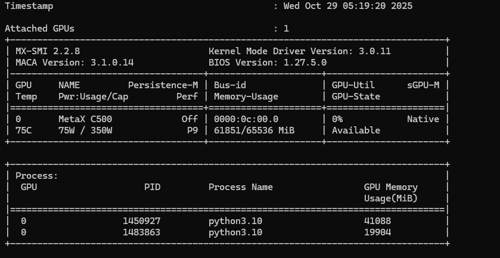
不行,你这个0.8 + 0.4 都超过显存大小了,第二个模型启动不起来,报错了:
ValueError: Free memory on device (9.79/63.62 GiB) on startup is less than desired GPU memory utilization (0.3, 19.09 GiB). Decrease GPU memory utilization or reduce GPU memory used by other processes. -
尊敬的开发者您好,麻烦在容器里输一下pip list | grep vllm命令,回显发一下
-
pip list | grep vllm 输出如下:
vllm 0.10.0+maca3.1.0.14torch2.6 -
尊敬的开发者您好,麻烦您在物理机执行mx-smi,回显请发一下
-
-
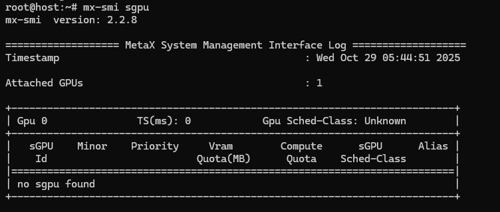
尊敬的开发者您好,请执行mx-smi sgpu,请发一下回显
-
-
尊敬的开发者您好,请使用v0引擎尝试,export VLLM_USE_V1=0
-
是在docker外面执行,还是docker里面执行:export VLLM_USE_V1=0
执行完了以后,所有模型服务重新启动吗? -
尊敬的开发者您好,docker里面执行:export VLLM_USE_V1=0,每次起服务之前都执行
-
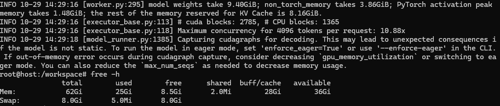
还是卡住,但是现在第二个模型启动的时候卡在这里, 是需要我启动的时候加上--enforce-eager吗?:
INFO 10-29 14:29:16 [executor_base.py:113] # cuda blocks: 2785, # CPU blocks: 1365
INFO 10-29 14:29:16 [executor_base.py:118] Maximum concurrency for 4096 tokens per request: 10.88x
INFO 10-29 14:29:18 [model_runner.py:1385] Capturing cudagraphs for decoding. This may lead to unexpected consequences if the model is not static. To run the model in eager mode, set 'enforce_eager=True' or use '--enforce-eager' in the CLI. If out-of-memory error occurs during cudagraph capture, consider decreasinggpu_memory_utilizationor switching to eager mode. You can also reduce themax_num_seqsas needed to decrease memory usage.内存情况如下:
-
尊敬的开发者您好,您第二个模型启动需要的GPU显存不足,请减少max model len长度,或切换其他参数量较小的模型。
-
我启动的时候显存还有40G, 支撑不了一个14B的4位量化模型吗不应该呀,--max-model-len 才 4096,
nohup vllm serve /data/model/qwen2.5-14b-instruct-awq/ --trust-remote-code --dtype bfloat16 --max-model-len 4096 --gpu-memory-utilization 0.36 --swap-space 16 --port 8000 & -
我设置到1024,还是卡住那里
-
尊敬的开发者您好,请按照回显相应提示进行操作。
-
把14B模型换成0.5B模型还是不行,卡在刚才那个位置,但是启动的时候切换成--enforce-eager就可以了
-
尊敬的开发者您好,您的回复已收到,感谢您的回复!
-
- By shuai_chen on 2025年10月30日 18:48.